This is a quick follow up (after 2 years still counts right?) on my previous post about Remote LAN access with WireGuard.
In the previous episode, we had the following setup:
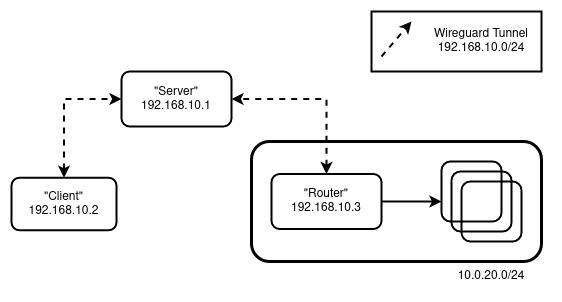
My main issue with this is that I lose privacy when accessing the general internet. We remedy this by doing:
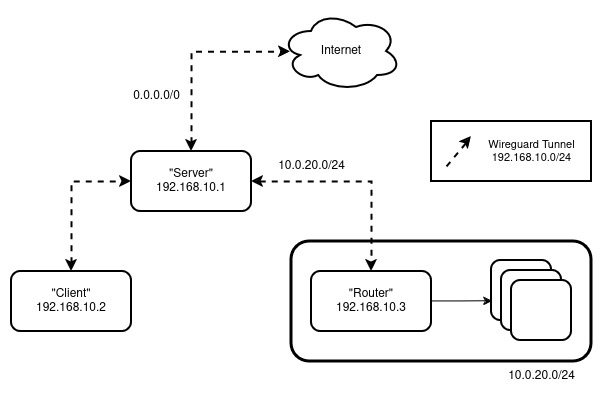
So now, any non-homelab traffic gets tunneled through the server instead of originating from my client.
Updated “Server” Config
To support the additional 0.0.0.0/0 outbound, we update the server config to:
[Interface]
Address = 192.168.10.1/32
ListenPort = 51820
PrivateKey = <Server's Private Key>
PostUp = iptables -A FORWARD -i wg0 -j ACCEPT; iptables -t nat -A POSTROUTING -o eth0 ! -d 10.0.20.0/24 -j MASQUERADE
PostDown = iptables -D FORWARD -i wg0 -j ACCEPT; iptables -t nat -D POSTROUTING -o eth0 ! -d 10.0.20.0/24 -j MASQUERADE
Don’t forget to update eth0 and 10.0.20.0/24 with your setup.
Updated “Client” Config
To force the “Client” to tunnel all requests to the “Server”, we update the client config to:
[Interface]
Address = 192.168.10.2/32
PrivateKey = <Client's Private Key>
DNS = <DNS IP>

[Peer]
PublicKey = <Server's Public Key>
Endpoint = <Server's Public IP>:51820
AllowedIPs = 10.0.20.0/24, 0.0.0.0/0
PersistentKeepalive = 25
The DNS here can either be a public one or within your homelab (10.0.20.0/24).
Bonus: UFW
If you are using ufw, you can update your settings with the following:
ufw allow 51820
ufw route allow in on wg0