The case of too much CI
I’ve recently started to dabble with Netlify to deploy this React + Redux app I’m building as *painless* and as transparent as possible. My initial roadblock was that Netlify was being “too eager” with building and deploying my app whenever I push to the production branch (yay Continuous Integration!). Meaning, the app would be built and deployed but without the tests being ran and considered. I initially hooked up the app to TravisCI which should take care of running the tests + linting. The problem now is that how do I tell Netlify to hold the deployment until TravisCI finished running?
TravisCI -> Netlify
I *think* I got the most sane way of triggering Netlify to publish (see I didn’t use the term deploy?) via TravisCI. Here’s what I did.
Step 1
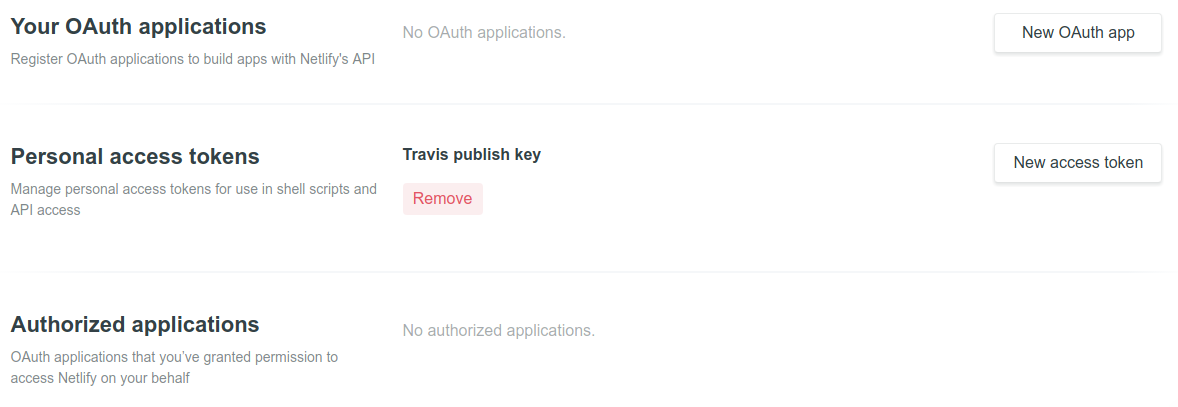
You need to create a personal access token that can be found on your account dashboard:
Step 2
Go to the settings tab of your repo’s TravisCI build page and add the key you just created as an environment variable. Be sure to keep the “Display value in build log” value to off:

Step 3
Add the following publish.sh file to your repo (anywhere in the repo is okay, just adjust your .travis.yml file). Be sure the replace the following:
YOUR_SITE_HERE- Your app domain in NetlifyENV_NAME_HERE- The name of the environment variable you entered in Step 2. (Don’t omit the $ though)
  #!/usr/bin/env bash

  # die on error
  set -e

  # https://gist.github.com/cjus/1047794
  echo 'Retrieving latest deploy...'
  url=`curl -H "Authorization: Bearer $ENV_NAME_HERE" https://api.netlify.com/api/v1/sites/YOUR_SITE_HERE/deploys`
  temp=`echo $url | sed 's/\\\\\//\//g' | sed 's/[{}]//g' | awk -v k="text" '{n=split($0,a,","); for (i=1; i<=n; i++) print a[i]}' | sed 's/\"\:\"/\|/g' | sed 's/[\,]/ /g' | sed 's/\"//g' | grep -w -m 1 'id'`

  # https://www.netlify.com/docs/api/#deploys
  echo "Publishing build ${temp##*|}..."
  curl -X POST -H "Authorization: Bearer $ENV_NAME_HERE" -d "{}" "https://api.netlify.com/api/v1/sites/YOUR_SITE_HERE/deploys/${temp##*|}/restore"
Step 4
Add the script in your .travis.yml file:
...your config...

after_success:
  - chmod +x ./publish.sh
  - ./publish.sh
Step 5
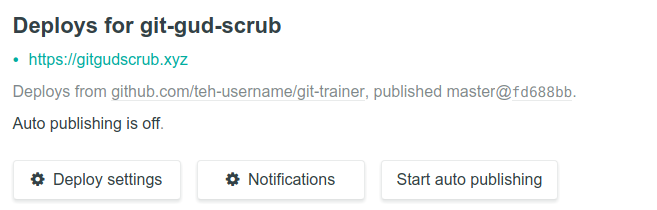
Be sure to turn off the “auto-publishing” setting for your domain. This is the key to what we’ve been doing. Whenever you push to your production branch, Netlify will automatically fetch and build your branch (you can’t turn this off). However, you can stop Netlify from auto-publishing it (i.e. making the branch live). This is then where TravisCI comes in. It will trigger Netlify to publish the recent build (your latest push) after it has verified that your app has passed all the tests.
Sample run
Here’s what your TravisCI log should look like:
Retrieving latest deploy...
  % Total    % Received % Xferd  Average Speed   Time    Time     Time  Current
                                 Dload  Upload   Total   Spent    Left  Speed
100 15956    0 15956    0     0  45474      0 --:--:-- --:--:-- --:--:-- 45588

Publishing build <latest build>...

  % Total    % Received % Xferd  Average Speed   Time    Time     Time  Current
                                 Dload  Upload   Total   Spent    Left  Speed
100  1228  100  1226  100     2   2158      3 --:--:-- --:--:-- --:--:--  2158

>>>Some json response dump for Netlify<<<
Update
Thanks to @giuliano_varriale, Netlify does enable auto-publishing once a build is pushed. I’ve also reached out to Netlify about this and they say it is the expected behaviour.

To work around this, Netlify has an API called lockDeploy to which we can call to automatically re-lock our deployment.
It is as simple as adding the following snippet to our publish.sh file:
# https://open-api.netlify.com/#/default/lockDeploy
echo "Locking deploy to ${temp##*|}..."
curl -X POST -H "Authorization: Bearer $NETLIFY_PUBLISH_KEY" -d "{}" "https://api.netlify.com/api/v1/deploys/${temp##*|}/lock"
Again, thanks to @giuliano_varriale for pointing out the problem and providing a solution.